Tutorials
Your filament dryer won't kill your spool labels. Your fingernail will.
August 18, 2026 · Kartzy Studio · 1 min read
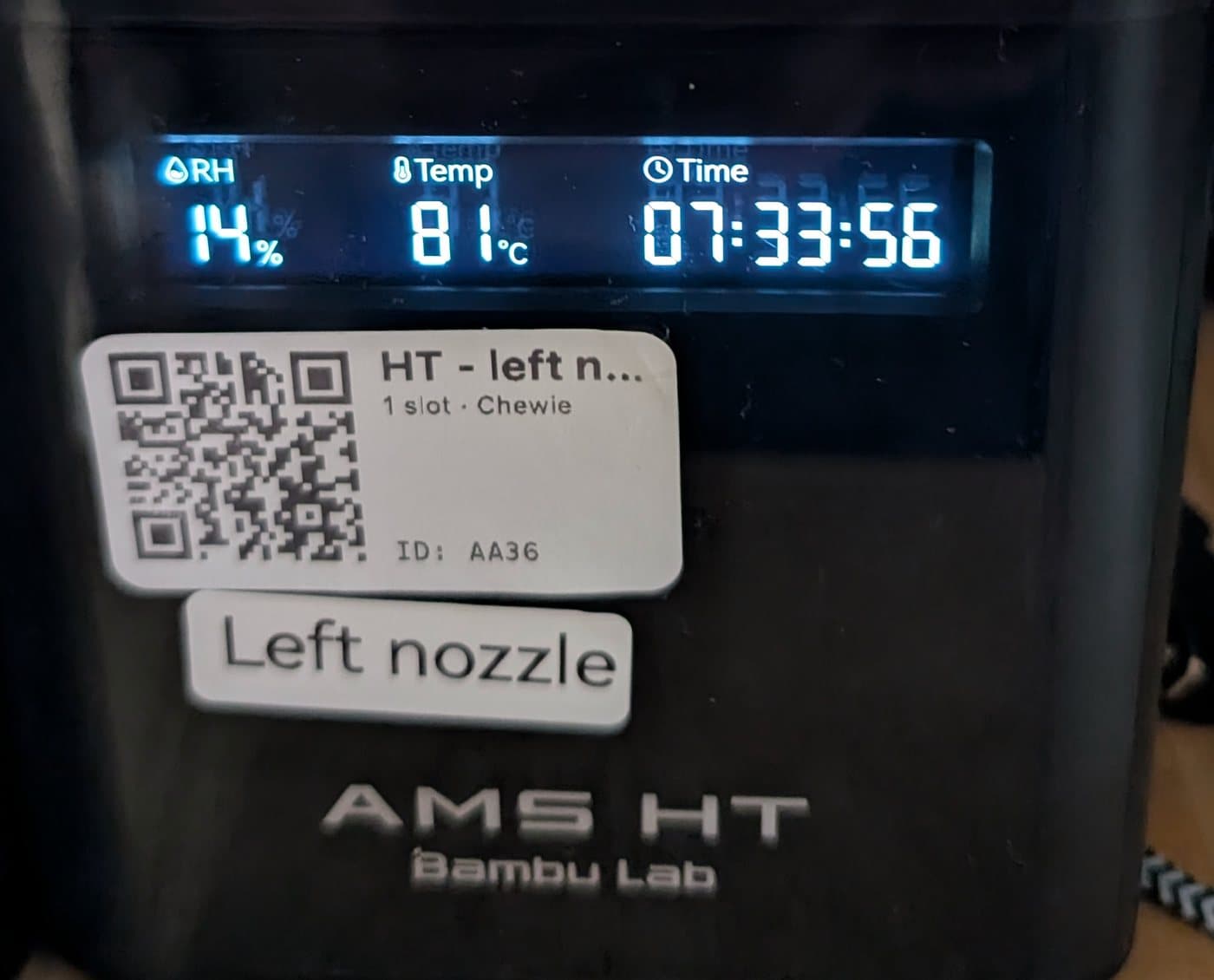
Direct thermal labels are supposed to fail at 70 °C. Mine spent eight hours at 81 °C and came out perfect — then blackened instantly under a fingernail.
The short version
- Direct thermal labels are widely said to fail completely at 70 °C — by companies selling both kinds of label. The mills that actually make the paper publish no activation temperature at all.
- Mine spent eight hours at 81 °C in a filament dryer and came out perfect. QR scannable, text sharp, no fogging at all.
- Then a fingernail blackened them in one second. Same label, same coating. Friction at a contact point is momentarily far hotter than any dryer.
- So the risk was never the dryer. It's handling. Spools dragged off shelves and gripped hard are what will eventually cost you a code.
- Just want the practical bit? Skip to "What this actually changes".
Somebody asked a question I hadn't thought to ask
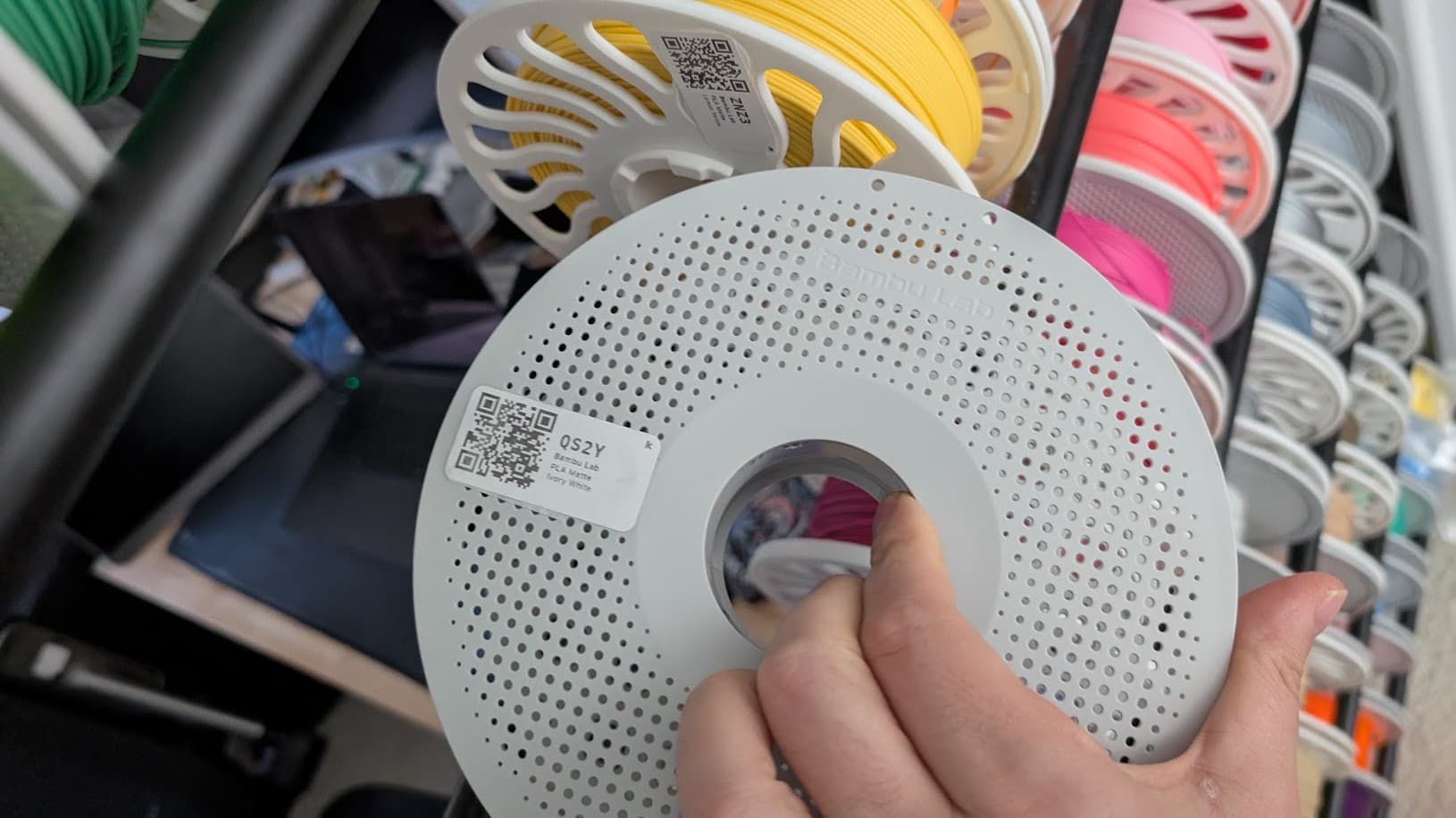
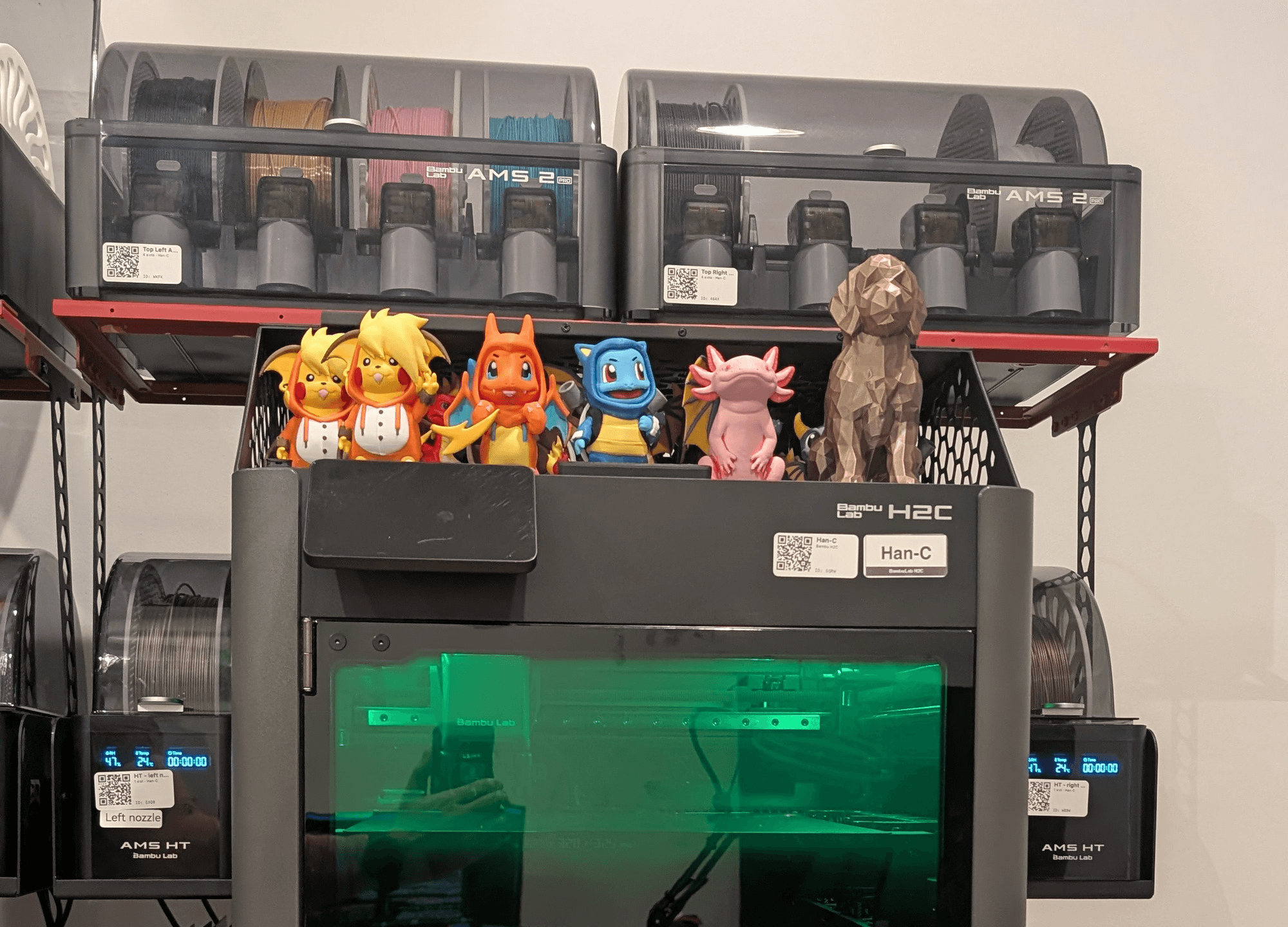
I've got more than 400 spools on a rack, and every one of them has a QR label. The code resolves to a page with that spool's identity, remaining grams, cost and history. It has been working for months.
Then a print farm operator called Bhaal, looking at a photo of the rack, said the thing that hadn't occurred to me:
"I can't imagine thermal labels fairing too well in the filament driers..."
It sounded obviously right the moment I read it.
Direct thermal printing has no ink. The label stock is coated with a leuco dye that turns black when it gets hot, and the printer is essentially a small, precise heating element. That's why the labels are cheap and why the printers are cheap.
Which means anything else hot also prints on them. The label cannot tell the difference between a printhead and a drying chamber.
And a filament dryer is a box whose entire job is to hold things at temperature for eight hours.
The numbers said I had a problem
The published figures are unambiguous. A durability comparison from Precision Label Products puts it plainly: direct thermal "begins degrading at temperatures above 80°F; completely fails at 158°F+." That's 27 °C and 70 °C. Thermal transfer — the version with a ribbon, on synthetic stock — they rate to 200 °F, or 93 °C.
Now put filament drying temperatures next to that. These are Bambu Lab's own published figures, not mine:
Material | Bambu's drying temperature | Against a 70 °C failure point |
PLA Basic / Matte | 50 °C | Comfortable |
PETG | 60–70 °C | Touches it |
TPU | 65–75 °C | At it |
ABS / ASA | 75–85 °C | Past it |
PC, PA, PAHT, PET-CF | 75–85 °C | Past it |
PPA-CF / GF | 100–130 °C | Far past it |
PPS, PPS-CF / GF | 110–140 °C | Far past it |
Source: Bambu Lab — Dry Filament
Read that table as an operator rather than as a chemist and it says something specific and unpleasant: my labelling system had a temperature limit sitting below most of the materials I actually dry. PLA would be fine forever. The week I took an ABS job, the system would start failing — silently, one spool at a time, with nothing visibly different about the labels.
I was ready to buy a thermal transfer printer. A few hundred dollars, plus ribbons, plus synthetic stock, forever.
Before spending it, I ran the test.
Eight hours at 81 °C
One labelled ABS spool. A Bambu AMS HT, set to 80 °C. Eight hours.
And before anyone asks whether the box actually got there — it reported 81 °C on its own display, at 14% relative humidity, with the cycle timer running. If anything the test ran slightly hotter than the setpoint, not cooler.
Worth being clear about what that is and isn't: 81 °C is not an extreme. Bambu's recommended range for drying ABS is 75–85 °C, so this was a routine cycle at the middle of the manufacturer's own band — not a torture test. Which is the point. This is what happens to a labelled spool on an ordinary Tuesday.

Here's the label afterwards.

Almost nothing. No fogging, no greying, a little loss of contrast (but not more than a few days old label), no softening of the edges. The QR scans first time. The printed type is exactly as crisp as the day it came out of the printer.
Eleven degrees above the temperature at which this stock is supposed to fail completely, for a full working day.
But they really are direct thermal
Here's where it gets interesting, because the obvious explanation is wrong.
The easy conclusion would be that I'd accidentally bought the durable kind — synthetic stock, or thermal transfer, and never noticed. That would make this a boring post about reading your own order history.
So I checked, and then I checked again.
Drag a fingernail across one:

Black streaks. Instantly. In exactly the tone of the printed text, because it is the printed text — same dye, same reaction, triggered by nothing but a fingernail dragged across the surface.
A fingernail deposits nothing. That's the coating developing.
These labels are unambiguously direct thermal, and they are extremely heat-sensitive. They simply aren't sensitive to this heat.
One note if you test your own: don't use a coin. A coin leaves metal on a glossy label and the grey smear looks exactly like thermal darkening. I did this first and couldn't tell the two apart. A fingernail, or a print bed at 100 °C, gives you an answer you can actually trust.
For the record, since a result like this is worthless without knowing exactly what was tested:
Printer | Rollo Wireless Shipping Label Printer, 4×6 thermal |
Label | Rollo Direct Thermal 2×1 Barcode Labels, roll of 1,000 |
Material | Paper — not synthetic, not transfer |
Cost | $9.99 per 1,000. One cent a label |
Dryer | Bambu AMS HT — 81 °C reported, 14% RH, 8 hours |
Paper direct thermal is the most vulnerable stock in the category. No synthetic facestock, no ribbon, no meaningful topcoat. If anything was going to cook, it was this.
Why both things are true
Friction is not bulk heat, and the difference is larger than it sounds.
Dragging a hard point across a surface concentrates energy into a contact patch of almost no area. The local temperature there spikes far above anything a dryer produces — for a few milliseconds, which is all the dye needs. That's why a fingernail works and a thumb doesn't.
Eight hours at a uniform 81 °C never reaches the activation threshold. One second of fingernail comfortably exceeds it.
Both facts are true at once, and they're describing completely different physics.
Which raises the obvious question about that 70 °C figure: it isn't describing the failure mode you actually face. It may well be an accurate number for some test I haven't seen. It is not a useful number for deciding whether to put a labelled spool in a dryer.
So where does 70 °C come from?
My first instinct was the cynical one: that number is published by people selling you thermal transfer. Precision Label Products, the source above, does sell thermal transfer ribbon. Tidy story.
It doesn't hold. LabTAG sells a heat-resistant direct thermal label, and their own product page says the same thing:
"Unlike standard direct thermal labels that darken when exposed to heat (≥+70°C), the printout of these labels remains readable and scannable by barcode scanners following the heating process (up to +95°C)."
That's a company selling direct thermal, quoting the same 70 °C threshold, to sell you a direct thermal product. So it isn't a competitor's talking point. And it's worth taking seriously: somebody built a specialist product around this failure, which means the failure is real for someone.
So I went to the people who actually coat the paper. There are only a handful of thermal paper mills in the world, and their datasheets are public.
They don't publish an activation temperature. Not one.
- Mitsubishi HiTec Paper's Thermoscript grade overview lists every grade against three columns — "Dynamic Sensivity", "Resistance", "Archivability (years)". Sensitivity is expressed as dots, one to four. Archival life runs 10 to 25 years by grade. Nowhere is there a temperature.
- Appvion's 2023 direct thermal catalog rates image sensitivity as Low, Medium, High and Ultra-High. Also no temperature. The only figure it gives is for the printer: "The heat applied by the thermal printer during imaging often exceeds 300⁰ F" — 149 °C.
Nor does the company that sold me the labels. Rollo's support site and its own explainer on thermal labels give no storage temperature, no operating range and no heat rating — only that direct thermal "may fade over time, especially when exposed to heat or sunlight" and can suffer "damage from moisture, high temperatures, or rough handling." Note which three things they list together. Hold that thought.
So the position is this. The 70 °C number is repeated across the industry by vendors on both sides of the direct-thermal/thermal-transfer line. It is not published by anyone who manufactures the coating. I could not find a primary source for it, a test method behind it, or a standard it derives from.
It might be right for some stock under some conditions. It was not right for mine, and I can't tell you why, because the people who would know don't say.
That is a less satisfying conclusion than "the vendors are lying to you". It's also the one the evidence supports.
What this actually changes
Don't buy a transfer printer because of your dryer. If you're on direct thermal and your hottest material is ABS, the evidence here says you're fine. Test your own setup rather than believing me — one spare label, one cycle, and you'll know.
And look at what the alternative would have cost. My labelling system for a 400-spool farm is a penny a label, on a printer I already owned for printing shipping labels. About $4 of consumables to code the entire rack. The upgrade I nearly bought is a few hundred dollars plus a consumable I'd have to keep buying, to solve a problem this test says I don't have.
Most print farms already own a shipping label printer. If you do, you already own the labelling system — which is the other thing nobody tells you.
Do think about handling instead. This is the real finding, and it inverts the usual advice completely — and it's the one thing Rollo does warn you about, buried in a list next to heat where nobody reads it.
Every time a spool is dragged off a shelf, stacked against its neighbour, or gripped hard while you thread the end, that's the load case that marks these labels. Not heat. Abrasion.
Three practical consequences:
- Put the label where hands don't go. The flat face of the flange, not the rim you grab.
- A clear laminate or overlay solves abrasion entirely, and costs a fraction of a new printer.
- If a code stops scanning, look for a scratch, not a stain. Heat fogging is uniform and grey. Abrasion is linear and dark, and it will run straight across your QR.
The honest limits
n = 1. One label stock, one dryer, one temperature, one duration.
I haven't tested cumulative exposure across many cycles, and slow fogging well below the activation threshold is exactly the kind of thing that appears on the twentieth cycle rather than the first. I've got a label going through repeat cycles now and I'll update this post with the result.
I haven't tested a dryer above 81 °C. That covers most of what a farm actually runs — Bambu puts ABS, ASA, PC and the nylons all in the same 75–85 °C band — but it says nothing about the high-temperature engineering materials. PPA is dried at 100–130 °C and PPS at 110–140 °C. If you're running those, you are well outside anything I've tested and I'd expect a paper label to lose. Test it before you trust it.
And this is one stock from one manufacturer. Paper direct thermal from Rollo is not automatically the same as paper direct thermal from anyone else — and as the mill datasheets above show, nobody publishes the number that would let you tell in advance. The method here transfers. The result might not.
If you run this and get a different answer, I'd like to know. Especially if you've got labels that have been through fifty cycles.
What you can do today
- Find out what your labels actually are. Fingernail on a blank one. If it blackens, direct thermal. If nothing happens, you're on transfer or laser and none of this applies to you anyway.
- Test at your hottest material's setting, not your most common one. The failure, if there is one, lives at the top of your range — and it arrives the week you change material, not gradually over time.
- Move your labels off the grab surface, or laminate them. That's the failure mode that's actually coming for you.
- Don't buy anything until you've done step 2. It costs one label.
Thanks to Bhaal in the 3D Print Farms Discord, who asked the question that started this. He was right that it was worth checking — the answer just went the other way.
We're building filament and spool tracking that works across a mixed farm — Bambu, Klipper, Snapmaker, whatever's on the shelf — because that's the farm I run. Join the waitlist and you'll be first in.
In the meantime the cost calculator and the filament colour matcher are live and free, no signup.
Come argue with us on Discord — if you've run this test and got a different answer, I want to hear it.
K
Written by
Kartzy Studio