Showcases
Filament inventory tracking: spreadsheet, Spoolman, and what comes after
October 20, 2026 · Kartzy Studio · 1 min read
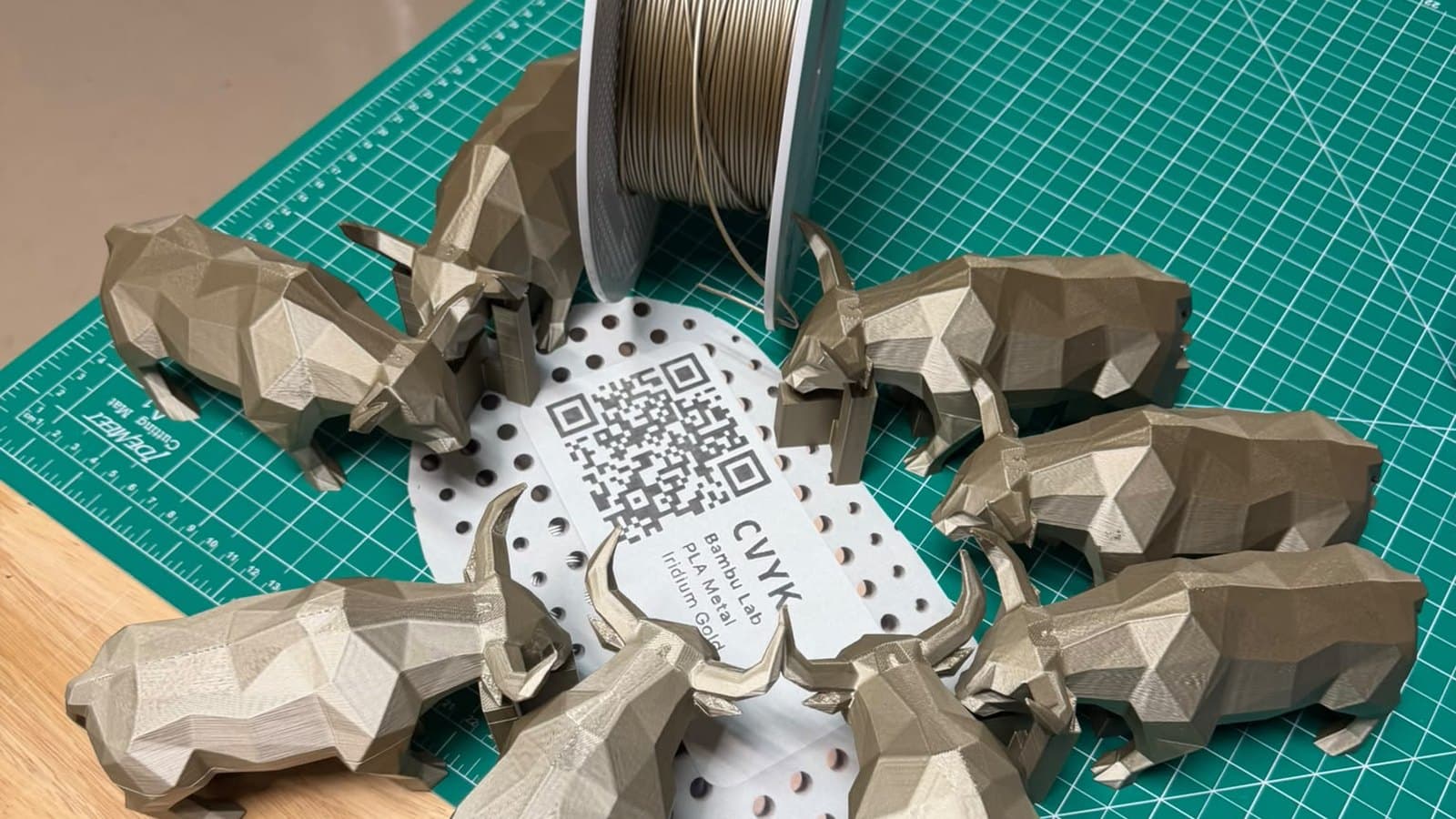
My filament spreadsheet said I had two spools left. The shelf had none. Here's how I went from a spreadsheet, to Spoolman, to building my own tracker, and what I learned about filament along the way.
The short version
- A spreadsheet works until your first busy week. You stop updating it, and then it's worse than looking at the shelf.
- Spoolman is a real step up. What wore me down was walking to the computer every time I swapped a spool.
- What fixed it was scanning at the printer. Scan the spool, scan where it goes, weigh it when it comes off. It adds a minute and gives you the exact gram.
- The gram matters because the same colour from a different batch doesn't always match.
The week I ran out of Iridium Gold
One of my top sellers on Etsy is a low-poly bull statue, printed in a metal finish. They're heavy prints: I like 20–25% infill, so when you pick one up it doesn't feel like cheap plastic. It already looks great, and the weight is something I like, and it looks like my customers like it too. That item has only 5-star reviews.
One week, five orders for it came in. At the time I had around 100 spools and 4 printers, and I was trying to manage all of it in a spreadsheet. I didn't know I was running low on Iridium Gold.
A plate with four of those bulls stopped at 80%. I went to get another spool, and there was none. My spreadsheet said I had two more.
Stage 1: the spreadsheet, and why it lied
For some of those items I would just press "print again", and I never wrote those prints down. That was the real problem: I wasn't updating the spreadsheet with the spools I was using. I'd leave it for later, and later, and it never happened.
Bambu takes 3–5 business days to deliver, and I didn't want to wait that long. So I bought the same Bambu Lab filament on Amazon. It arrived the next day. I put it on the printer, and the tone was slightly different, enough not to pass my own quality check. I lost half a spool that day.
That's when I realized the way I was keeping my inventory wasn't helping. It was no better than walking to the shelf and looking. And things were getting busier, with consignment stores and more B2B orders coming in. I needed to see my inventory without checking the shelves.
Stage 2: Spoolman
So I moved to Spoolman. It helped, but I didn't use it for long. What I didn't enjoy was using it day to day. It's built like a spreadsheet, with lots of fields and values. On the dashboard, a location was just a name, so a spool in a printer looked the same as a spool on a shelf. It wasn't clear at a glance what I had, or how many of each spool.
And every time I changed a spool, I had to go to my computer, weigh the spool and update it. It's only a few steps, but when you do that for 4 printers with 4 spools each, it takes a long time.


If you want a fair look at Spoolman, including who should keep using it, I wrote that up here: Spoolman without the server.
Stage 3: my own tracker, at the printer
I thought: "What if I could scan my spool into my printer? And when I remove it, I could update it on my phone, right there at the printer." So I did what most software developers like to do: I solved my problem with new in-house software.
I needed QR codes for that, and the 3D Filament Profiles site gave me some ideas on how to do it. It's a great tool for filament tracking too. I made QR codes for the spools, then for the printers, the AMS and the AMS HT. Now I scan the spool, then the place where it goes: an AMS slot or the printer.
When I unload, I'm right there at the table, and my scale is there too, so weighing isn't a hassle anymore. Scan to load or unload, weigh, and it adds a minute or two to your workflow. What you get back is precision: you know exactly how much of each open spool you have, plus all the sealed ones. When a new order comes in, you know whether you can fill it.
One detail matters here: the scale weighs the filament and the reel together, and empty reels aren't the same across brands. An empty Bambu Lab reel weighs 239 g, for example. The tracker knows which reel each spool came on, so I never type a reel weight, and the number left over is the filament.
Since then, I haven't run out the way I did that week. I log every spool change and weigh every spool, so I know how much I have, and I know when something is running low and it's time to order more.
And the "print again" problem from the start? When I swap a spool, the tracker asks one question: did it run out? If a spool is empty but my log says it should still have filament left, that's printing I forgot to log, and I see it right there at the printer, not weeks later at an empty shelf.

Why track filament to the gram?
Why would anyone need to know to the gram how much a spool weighs after a print? Can't you just put on another spool when it runs out?
If you've read this far, you know why not. The same filament from the same brand isn't always exactly the same tone. A slight colour difference from one batch to the next is enough to kill the quality of your model. If you know how much your spool has, you know whether you can print two, three or four more of that model before you have to open a new one. That's the whole idea: print the full order from one spool, instead of switching to a new spool halfway through, because a different batch can have a different tone. And that's just one example.
Logging the weight of each spool and checking it against the slicer showed me something else: the slicer is quite accurate. On one plate, the slicer said 582.74 g, and my scale measured 583 g after the print.
The Bambu AMS also tracks filament, and it seems to do it automatically. So why not use that? Because the AMS doesn't really count your filament. That was a rabbit hole I went down with some people on Discord. Long story short: the AMS doesn't count grams, it counts rotations, and that isn't as precise. The details are here: How the Bambu AMS actually tracks filament.
Where did the filament go?
With my tracker running, I was taking filament off the spools, and it was just gone. Where did it go? What did I print with it? That's when I realized filament tracking was only the beginning. There was so much more to track, starting with how much each print actually cost.
So I wrote down all my ideas and everything I'd need, and that's how printfarm.tools came about. I needed tools for my farm: a way to check my filament inventory, my models, my printers. Ideas came way faster than I could build them.
And since the slicer is so precise, I don't need to weigh a spool after every print. If my models carry the information of what I'm printing, I can just say: "I'm printing this model on that printer, loaded with that spool." I log the print, and the filament comes off the spool automatically. And when I do weigh a spool and enter it by hand, the tracker checks that weight too.
Ideas like that turned into a roadmap with over 500 tasks. So far I've done 175. This thing has so much potential, and so much still to be done.

A quick word on cost
One of the first tools I built after the filament tracker was a cost calculator. There are tons of them out there, but the same print got a different price in each one, and none seemed to include everything that really goes into the cost. Filament and printer time are only part of it. There's electricity, machine wear and tear, maintenance, extra parts on the models (keychain rings, clickers), failed prints, and the one people like to leave out: your own time.
My first calculator was better, but not enough. It's never enough, so I kept improving it. In the current version you can compare your price across sales channels and see the minimum that covers your material, your costs and your time. The cost calculator is free, no signup. It's one of the free tools I have available, and more are coming. But enough about the calculator: we're here to talk about filament tracking.
What it looks like today
Bring your spools with you
Because I'd used Spoolman and already had my spools in it, I needed a way to bring them over, so the import already works with a Spoolman export. Your own spreadsheet works too: select which column holds which information, and all your spools come in. The full walkthrough is in the Spoolman post.

Tracked types and the wishlist
Two features I love, and they're completely different things. Tracked types are the filaments you use every day: when one runs low, you can see what you need to buy. The wishlist is for spools from brands you want to try, to see how they print. A blacklist is coming next, for the spools you never want to buy again.

Incoming orders
This one saves so much typing. Take the invoice from the store you ordered from, and the spools are mapped automatically. Wait for the box, then check the spools in, without typing a single thing. Right now it reads invoices from Bambu Lab, Polymaker, Amazon and SUNLU, and other brands are on the way.


Follow the build
I'm a solo developer, so all of this takes a while. I'm planning to let a few people in for a beta soon, and the tool will be completely free while it's in beta.
Do you want to know how the building is going? Sign up for the waitlist. Every two weeks I send an update on what I've done, share some frustrations and ask a few questions, because I realized this isn't only solving my problems. It's solving other makers' problems too.
We're building software for people who sell 3D prints. Join the waitlist and you'll be first in.
The cost calculator is live and free, no signup.
K
Written by
Kartzy Studio